M-LDP-DA-01
MPLS
- What/Why: Multiprotocol
- IP/Eth/ATM/FR
- How: Label Switching
Data Plane (DP)
- Data plane remains mostly unchanged over time; defined in RFC3031, RFC3032
- No concept of src/dst address – replaced by MPLS label (routers generally only look at dst address anyway)
MPLS Label: Instruction for packet treatment- Instructions are not carried in the packet, instead programmed in device (control plane)
Lookup: Router process to locate the instructions for a labeled packet in the control plane
MPLS Label
- Defined in RFC3032
- Stored in TCAM
- MPLS header comes after L2 header (always encapsulated within L2), can encapsulate L3 (IP) or L2 (Eth)
- Sometimes called “L2.5”, “L2+” maybe more accurate
Fields
- Label: Label Value, 20 bits
- Lowest: 0, Highest: 2^20 (1,048,575)
- Exp: Experimental Use, 3 bits [used for QoS, CoS bits; RFC5462: Traffic Class]
- S: Bottom of Stack, 1 bit
- Indicates that the following header is either MPLS (0) or non-MPLS (1) (when multiple MPLS headers are ‘stacked’)
- TTL: Time to Live, 8 bits
Label Opacity
When a router recieves an MPLS packet (has MPLS header), it uses the first header to determine the forwarding instructions. Any further MPLS headers are ignored (hidden)
Instructions
- Stored in MPLS LBL FIB
- MPLS LBL FIB conains
MPLS Label Value->Exit Ifc, Next Hop Addr, MPLS Actions/Operation
- MPLS LBL FIB conains
MPLS Actions
Add the label (Push)Adds a label to the top of the stack of labels, increasing stack depthReplace the label (Swap)Swaps the label at the top of the stack to a new label, stack depth remains the sameRemove the label (Pop)Removes the label at the top of the stack, stack depth decreases
Reserved Labels
0: IPv4 Explicit Null (aka, “pop the label” Pop + perform an IPv4 lookup)1: Router Alert2: IPv6 Explicit Null3: Implicit Null (aka, “pop the label”)4-6: Unassigned7: Entropy Label Indicator (ELI)8-12: Unassigned13: Generic Associated Channel14: OAM Alert15: Extension Label (XL)
Packet Forwarding
Limited IP CoreMPLS network does not know IP routes for packets it is forwarding
Tables
IP FIB (w/o MPLS) – Contents: IP Subnets – Key: IP Addresses – Results: Exit Ifc, Next Hop Info (Adj table)
IP FIB (w/ MPLS) – Contents: (same) – Key: (same) – Results: Exit Ifc, Next Hop Info (Adj table), Optional: MPLS Action
MPLS Label FIB – Contents: MPLS Labels – Key: MPLS Label – Results: Exit Ifc, Next Hop Info (Adj table), MPLS Actions
Control Plane (CP)
TDP: Prestandard version of LDP (Cisco specific)LDP: Dynamic protocol to distribute MPLS paths; this tech is on it’s way outRSVP:BGP-LU:SR: Segment routing; latest and greatest MPLS control plane
Static Label Switched Paths (LSP)
- Take a destination IP (FIB entry) and bind an MPLS label
Create static MPLS action
“Binding”: Bind an IP CEF entry to an MPLS action
mpls static binding ipv4 <dest-prefix> <dest-mask> <input|output> <dest-nexthop> <label-id>
Create a static MPLS label
mpls static labelswitch <incoming-label-id>
  moi out-interface <output-intf> ipv4 <nexthop-ip> <outgoing-label-id>
BGP-Free Core
- Only edge routers run BGP, core is MPLS packets destined between edge routers
Label Distribution Protocol (LDP)
- Autodiscovery
HELLOpackets- Dest IP (Multicast): 224.0.0.2 (AllRouters)
- Uses UDP (Src/Dst Port: 646)
- Neighbor advertises unicast IP (XPort IP, usually same as LSR-ID – must be routable) for creation of neighbor->neighbor TCP session
- LDP-ID (LSR-ID: LABELSPACE)
- Highest Loopback = LSR-ID
- Ethernet: LABELSPACE = 0 (per platform, not per interface)
- Session (neighborship) creation
- Created using XPort IP (Dst IP)
- TCP session (Dst Port: 646, Src Port: ephermal) (client/server)
- Two types of messages
Label Mapping MSG- Advertises local bindings (IPv4 Addr + MPLS Label)
Address MSG- ??
- Independent LSP Control (generate labels for everything) [Cisco]
- Ordered LSP Control (generate binding for local routes and any bindings that were recieved from other rtrs)
LDP Configuration
- LDP starts when
mpls ipis enabled on an intf
See bindings: show mpls ldp bindings
See autodiscovery: show mpls ldp discovery [detail]
Set MPLS LDP transfer address (config-if) mpls ldp discovery transport-address [ip|interface]
MPLS Configuration
See all MPLS intfs
show ip mpls interfaces
Show MPLS LFIB
show mpls forwarding-table
Enable MPLS on intf
interface <intf>
  mpls ip
MPLS L3VPN
- SP provdes “router as a service”
- Customer advertises routes to SP router, which advertises other customer routes
Goals
- Separation between Customer (C) routes
- No C-routes in the core (P routers)
- C-routes separated at PE routers
- Each customer space assigned unique identifier
- No longer IPv4 routes, now L3VPN routes (and BGP AF)
- Each customer space assigned unique identifier
- BGP to distribute routes between PE’s
Separation of C-Routes
- Utilizes “route distinguisher” attached to each IPv4 route
- 64-bits
- NN = unique number
- AS:NN
- IPv4:NN
- 4BAS:NN
- Becomes part of the route (NLRI) within BGP, so it would be unique even if IPv4 is same
- 64-bits
- New BGP address family
- RD:IPv4 (64 bits + 32 bits = 96 bits)
- Example: ASN:NN:IPV4ROUTE
- 10:1:10.1.1.1
- Example: ASN:NN:IPV4ROUTE
- New address family called
VPN-IPv4(orVPN-IPv6)- Cisco:
VPNv4 - Juniper:
INET-VPN
- Cisco:
- RD:IPv4 (64 bits + 32 bits = 96 bits)
- PE: Advertises C-Routes as VPNv4
- VRF (on PE router) becomes associated with a VPNv4 RD
- virtual router (on local router) + RD = VRF
- VRF:RD is 1:1 relationship
Policy Administration
- Uses tags, not RD – because single tag is insufficient for complex policy
- Originating PE: attaches tags per export policy
- Receiving PE: inspects and imports tags per import policy
- BGP doesn’t have tags, instead has attributes
- Extended-Communities (64 bits)
- Route-Target: used for tagging purposes
- AS:NN
- IPv4:NN
- RD (part of VPNv4 route/NLRI) is not same as RT (BGP extended community)
- Route-Target: used for tagging purposes
- Extended-Communities (64 bits)
VPNv4 configuration
- iBGP between PE’s, MPLS+LDP+OSPF across core
PE configuration
! Create VR for routes
vrf definiation VRF_BLUE
 rd 10:101 ! <asn:unique>
 route-target import 102:102 ! <>
 route-target export 101:101
 address-family ipv4 unicast
 exit

! Add customer facing interface to VR
interface <intf>
 vrf forwarding VRF_BLUE

! Move Cust->SP eBGP to VR
router bgp <asn>
 address-family ipv4 unicast vrf VRF_BLUE
  neighbor <cust-ip> remote-as <cust-as>

! Exchange VPNv4 routes
router bgp <asn>
 address-family vpnv4 unicast
  neighbor <peer-pe-ip> activate
! See routes inside of VRF show bgp vpnv4 unicast <rd|vrf> <vrf-name>
How does receiving PE know which VRF data plane traffic is placed in? Stacked MPLS labels – the VPNv4 path gets an “inner” label.
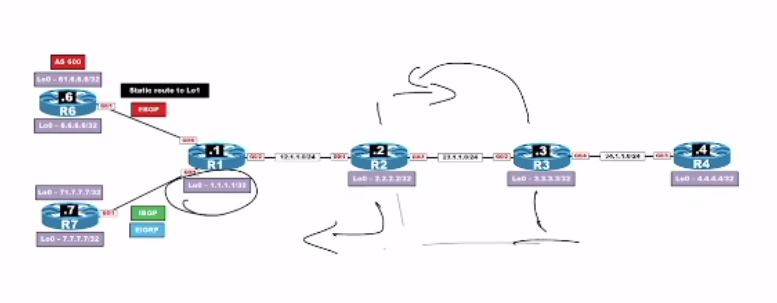
There may be different routing options such as:
Static routing
iBGP
eBGP
EIGRP
OSPF
On R2 to R4, we can verify OSPF routes using the command:
show ip route ospf | include 1.1.1.1
On R4, the same command:
show ip route ospf | include 1.1.1.1
returns the following result:
O 1.1.1.1/32 [110/xx] via 34.1.1.3, GigabitEthernet0/3
To check the control plane (RIB), we use:
show ip route 1.1.1.1
To check the data plane (CEF), we use:
show ip cef 1.1.1.1
Both commands should show the next-hop information:
34.1.1.3, GigabitEthernet0/3
On R1, if we run:
show ip route | begin Gateway
we can observe multiple routing entries such as:
OSPF routes
BGP routes (for example, B 6.6.6.6 [20] and B 7.7.7.7 [200])
EIGRP routes (denoted by D)
Static routes (denoted by S)
When working with MPLS, the label protocol can be:
LDP (Label Distribution Protocol)
TDP (Tag Distribution Protocol) → this is tag-based, not label-based
LDP is based on the interface. For example:
interface GigabitEthernet0/x
mpls ip
When configuring MPLS with OSPF, we can use:
router ospf 1
mpls ldp autoconfig area 0
We can verify the label range using:
show mpls label range 16 100000
By default, the minimum value is 16 and the maximum is 1048575.
For manual label range assignments:
On R1: mpls label range 100 199
On R2: mpls label range 200 299
On R3: mpls label range 300 399
On R4: mpls label range 400 499
In practice, I have not seen any service provider make such a simple classification of label ranges.
Prerequisites for enabling LDP:
CEF (Cisco Express Forwarding) must be enabled.
MPLS IP must be enabled globally.
Example configuration when enabling MPLS IP:
On R1:
interface GigabitEthernet0/2
mpls ip
On R2 to R4:
router ospf 1
mpls ldp autoconfig area 0
on R1
sh mpls ldp binding local
Step #1
Each LSR, locally assigns a label to 1.1.1.1 32
on R1
sh mpls ldp binding local 1.1.1.1 32
imp null
on R2
sh mpls ldp binding local 1.1.1.1 32
200
on R3
sh mpls ldp binding local 1.1.1.1 32
300
on R1
sh mpls ldp binding local 1.1.1.1 32
400
Step #2
on R1
sh mpls ldp binding 1.1.1.1 32
L = imp_null
R=2.2.2.2
on R2
sh mpls ldp bind 1.1.1.1 32
L=200
R=R1 – implicit null
R =R3=300 – LLR (Liberal Label Retention)
On R3
sh mpls ldp bind 1.1.1.1 32
L=300
R=R2 – 200
R = R4 – 400
On R4
sh mpls ldp bind 1.1.1.1 32
L=400
R=R3 – 300
Data Plane
On R4
sh mpls forward 1.1.1.1 32
Local out
400 3000 1.1.1.1/32 34.1.1.3 gi0/3
LFIB
sh mpls ip bind 1.1.1.1 32
in = 400
out = 300 — R3 in use
sh ip cef 1.1.1.1
NH (Next hop Ip address) = 34.1.1.3 , gi0/3 , 300
On R3
sh mpls for 1.1.1.1 32
Local out
300 200 1.1.1.1/32 23.1.1.2 gi0/2
sh mpls ip bind 1.1.1.1 32
in = 300
out = 200 —– in use
out = 400
sh ip cef 1.1.1.1
NH = 23.1.1.2, gi0/2 , 200
on R2
sh mpls for 1.1.1.1 32
Local out
200 pop label 1.1.1.1/32 12.1.1.1 gi0/1
sh mpls ip bind 1.1.1.1 32
in = 200
out = R1 imp null — in use
out = R3 —300
Sh ip cef 1.1.1.1
NH=12.1.1.1, gi0/1
Applications of MPLS
LDP = swap + pop
L3VPN =
